
.png)
Description
Download AI Video Summary Top – Free AI Video Summarizer for YouTube
Overview
AI Video Summary Top is a web‑based AI text summarizer that instantly turns lengthy YouTube videos into concise, readable articles. By simply pasting a YouTube URL, the tool activates a suite of advanced natural‑language‑processing models that scan the video’s transcript, identify core concepts, and generate a clear summary that captures the essential points. The service is designed for educators who need quick lecture overviews, researchers looking for rapid literature reviews, and content creators who want to repurpose long‑form material into bite‑size insights. Because the platform runs entirely in the browser, there is no need for a heavyweight download or installation—just a stable internet connection and a modern browser. While the tool shines when summarizing well‑structured, English‑language videos, its performance can vary with poor audio quality, heavy background noise, or videos that rely heavily on visual cues without spoken explanation. Nonetheless, AI Video Summary Top offers a seamless integration with YouTube, a clean user interface, and the ability to revisit previously summarized videos for future reference. This makes it a valuable addition to any workflow that relies on extracting knowledge from video content quickly and securely.
Key Features
- One‑Click Summarization: Paste a YouTube URL and receive a summary in seconds.
- AI‑Powered NLP Engine: Utilizes state‑of‑the‑art transformer models to understand context and retain key information.
- Export Options: Download summaries as plain text, PDF, or copy directly to clipboard.
- History Log: Automatic storage of previously summarized videos for easy retrieval.
- Responsive Design: Works on desktop browsers, tablets, and smartphones without loss of functionality.
- Secure Processing: All data is processed over HTTPS, and no video files are stored on the server.
- Multi‑Genre Support: Handles tutorials, lectures, podcasts, webinars, and entertainment videos equally well.
- Free Tier with Unlimited Summaries: No hidden fees for basic usage; premium plans add faster processing and longer video limits.
Installation & Usage Instructions
Step‑by‑Step Guide
Even though AI Video Summary Top is a web application, following a clear workflow ensures you get the best possible summary.
- Open Your Browser: The tool is compatible with Chrome, Firefox, Edge, Safari, and most modern browsers. For optimal performance, use the latest version.
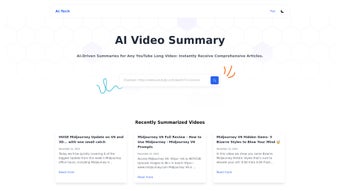
- Navigate to the Site: Go to aivideosummarytop.com. The homepage presents a clean input field labeled “Enter YouTube URL”.
- Copy the Video URL: Open YouTube in a separate tab, locate the video you want to summarize, and copy the URL from the address bar (e.g., https://www.youtube.com/watch?v=XYZ123).
- Paste & Submit: Return to AI Video Summary Top, paste the URL into the input field, and click the “Summarize” button.
- Wait for Processing: The AI engine typically finishes within 10‑15 seconds for videos under 20 minutes. A progress bar indicates the status.
- Review the Summary: The generated article appears in a scrollable pane. You can edit the text manually if needed, then choose an export format.
- Save or Share: Click “Download PDF” to keep a copy, or use the “Copy to Clipboard” button to paste the summary into another document or email.
For users who plan to summarize many videos, consider creating a free account. Registration unlocks the history log, allowing you to revisit past summaries without re‑entering URLs. The account also syncs your preferences, such as default export format and summary length.
Because the service is cloud‑based, there are no system requirements beyond a stable internet connection. However, a broadband connection (≥5 Mbps) helps reduce latency, especially for longer videos.
Compatibility & System Requirements
AI Video Summary Top runs on any operating system that supports a modern web browser, including Windows 10/11, macOS Monterey and later, Linux distributions, Chrome OS, Android (via Chrome or Firefox), and iOS (Safari or Chrome). The tool does not require any additional plugins, Java, or Flash, making it a truly cross‑platform solution.
Because the application processes video transcripts on the server side, the local device’s processing power has minimal impact on performance. Users with older hardware may experience slightly longer loading times, but the summarization itself remains fast and reliable. For mobile users, the responsive interface automatically adapts to smaller screens, preserving the same functionality as the desktop version.
Pros and Cons
What Users Love
- Instant, one‑click summarization saves hours of manual note‑taking.
- Free tier offers unlimited summaries, making it accessible for students and hobbyists.
- Secure HTTPS processing ensures privacy and data protection.
- History feature eliminates the need to repeat work for previously summarized videos.
- Responsive design works seamlessly on both desktop and mobile devices.
Areas for Improvement
- Currently limited to English‑language videos; multilingual support is not available.
- Does not handle non‑YouTube platforms (Vimeo, Dailymotion, etc.).
- Summaries depend on the quality of the original transcript; videos with poor audio may yield less accurate results.
- No offline mode – an active internet connection is mandatory.
- Premium plans are required for very long videos (>60 minutes) and faster processing.
Frequently Asked Questions
How does AI Video Summary Top generate a summary?
The tool extracts the video’s auto‑generated transcript, feeds it into a transformer‑based language model, and then uses summarization algorithms to distill the most relevant sentences into a coherent paragraph.
Is there a limit to the length of videos I can summarize?
The free version supports videos up to 20 minutes. Premium users can summarize videos up to 60 minutes, and an enterprise plan removes the limit entirely.
Do I need to create an account to use the service?
No. You can generate summaries anonymously. However, creating a free account unlocks the history log and allows you to customize export preferences.
Can I summarize videos that are not in English?
At present, the AI engine only processes English transcripts. Multilingual support is planned for a future update.
Is my data stored or shared with third parties?
All processing occurs over encrypted HTTPS connections, and the service does not retain video files or transcripts after the summary is generated, ensuring user privacy.
Conclusion & Call to Action
AI Video Summary Top bridges the gap between endless video content and the need for quick, digestible information. Its AI‑driven summarization engine, zero‑installation approach, and free unlimited usage make it an essential tool for anyone who regularly consumes YouTube material—whether you’re a student, researcher, marketer, or casual viewer. While the current focus on English‑only, YouTube‑exclusive content may limit some users, the platform’s solid privacy stance, responsive design, and robust feature set outweigh these constraints for the majority of use cases.
If you’re ready to streamline your learning workflow, save time on note‑taking, and instantly access the core ideas of any YouTube video, download AI Video Summary Top now. Start with the free tier, explore the premium options when you need faster processing, and join a growing community of knowledge‑hungry professionals who rely on AI to stay ahead.
Guides & Tutorials for AI Video Summary Top
How to install AI Video Summary Top
- Click the Preview / Download button above.
- Once redirected, accept the terms and click Install.
- Wait for the AI Video Summary Top download to finish on your device.
How to use AI Video Summary Top
This software is primarily used for its core features described above. Open the app after installation to explore its capabilities.
User Reviews for AI Video Summary Top 0
No reviews found




